




这是什么?
该组件由 OneWildMaggot基于Ankv的钠 版式制作。这个组件为版头标题和顶栏增加了入场淡入动画
顶栏颜色引用了钠版式中的版头背景颜色,如果你更改了版头的颜色或使用了暗色模式,不需要重新定义这个组件中的顶栏颜色🤓👆。
这个组件同时还对Blanxers_lwwl14的动画式渐显和钠版式做了兼容😋
使用方法
你可以将该组件的[[include]]置于钠版式的[[include]]之后使用这个组件,就像这样:
[[include :scp-wiki-cn:theme:sodium]]
[[include :scp-wiki-cn:component:bettersodiumthemeheader-backend]]
如果你还想要使用动画式渐显,可以将动画式渐显的[[include]]置于该组件的[[include]]和钠版式的[[include]]的中间,就像这样:
[[include :scp-wiki-cn:theme:sodium]]
[[include :scp-wiki-cn:component:sigma-9-ani]]
[[include :scp-wiki-cn:component:bettersodiumthemeheader-backend]]
+ 变量说明
:root {
      --header-title-fade-duration: 1.2s;/* 版头主标题入场淡入动画时间 */
      --header-subtitle-fade-duration: 1.5s;/* 版头副标题入场淡入动画时间 */
      --topbar-height: 63px;/* 顶栏高度 */
      --topbar-bg-color: var(--sodium-bg-color);/* 顶栏颜色 */
      --topbar-alpha: 95%;/* 顶栏颜色透明度 */
}
+ 源代码
:root {
  --header-title-fade-duration: 1.2s;
  --header-subtitle-fade-duration: 1.5s;
  --topbar-height: 63px;
  --topbar-bg-color: var(--sodium-bg-color);
  --topbar-alpha: 95%;
}

#header {
  position: relative;
  overflow: hidden;
}

#header h1 a span::before,
#header h2 span::before {
  color: var(--sodium-text-color);
}

#header h1 a span::before {
  animation: fadeInUp var(--header-title-fade-duration) ease-out forwards;
}

#header h2 span::before {
  animation: fadeInUp var(--header-subtitle-fade-duration) ease-out .6s forwards;
  opacity: 0;
}

@keyframes fadeInUp {
  from {
    opacity: 0;
    transform: translateY(10px);
    filter: blur(4px);
  }
  to {
    opacity: 1;
    transform: none;
    filter: none;
  }
}

#top-bar {
  position: fixed !important;
  top: 0 !important; left: 0;
  height: var(--topbar-height);
  width: 100% !important;
  z-index: 999;
  overflow: visible !important;
  box-sizing: border-box;
  display: flex !important;
  align-items: center;
  background-color: var(--topbar-bg-color);
  will-change: transform;
  backface-visibility: hidden;
  opacity: 0;
  transform: translate3d(0, var(--header-height), 0);
  animation: nav-snap linear both, topBarSlideIn 1s ease-out .9s forwards;
  animation-timeline: scroll(root), auto;
  animation-range: 0 var(--header-height), 0;
  backdrop-filter: blur(2px) ;
  -webkit-backdrop-filter: blur(2px) ;
}

@keyframes nav-snap {
  from {
    transform: translate3d(0, var(--header-height), 0);
  }
  to {
    transform: none;
  }
}
@keyframes topBarSlideIn {
  to {
    opacity: 1;
  }
}

#top-bar .top-bar,
#top-bar .mobile-top-bar {
  flex-grow: 1;
}

#top-bar .top-bar ul li a,
#top-bar .mobile-top-bar ul li a {
  font-size: 1em !important;
}

#top-bar .top-bar ul li ul,
#top-bar .mobile-top-bar ul li ul {
  max-height: calc(100vh - var(--topbar-height) - 24px) !important;
  overflow: hidden auto !important;
  -webkit-overflow-scrolling: touch;
  scrollbar-width: thin;
}

#top-bar .mobile-top-bar ul {
  max-height: none !important;
  overflow: visible !important;
}

#top-bar .mobile-top-bar .open-menu {
  margin-right: 16px;
}

@media (max-width: 767px) {
  #top-bar .mobile-top-bar {
    position: relative;
    height: 100%;
    display: flex;
    align-items: center;
    justify-content: flex-end;
  }

  #top-bar .mobile-top-bar .open-menu {
    position: static !important;
    float: none !important;
    margin: 0 !important;
  }

  #top-bar .mobile-top-bar ul {
     top: 100% !important;
  }

  #top-bar .top-bar ul li a,
  #top-bar .mobile-top-bar ul li a {
    font-size: .85em !important;
  }
}

@supports (background: color-mix(in srgb, var(--sodium-bg-color) var(--topbar-alpha), transparent)) {
  #top-bar {
    background: color-mix(in srgb, var(--sodium-bg-color) var(--topbar-alpha), transparent);
  }
}

@keyframes main-title {
  0% {
    opacity: 0;
    transform: translateX(-50%) translateY(-20px);
  }
  100% {
    opacity: 1;
    transform: translateX(-50%) translateY(0);
  }
}

@keyframes sub-title {
  0% { opacity: 0; transform: translateX(-50%) translateY(20px);
  }
  100% { opacity: 1; transform: translateX(-50%) translateY(0);
  }
}
模块暂不可用: 此动态功能尚未由只读迁移站支持。
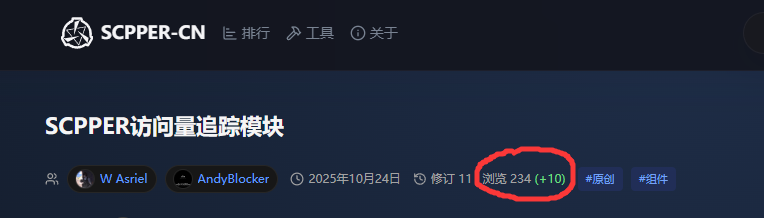 去重方式为,12小时内的同IP访问被视为同一次访问。用以下方式引用组件:
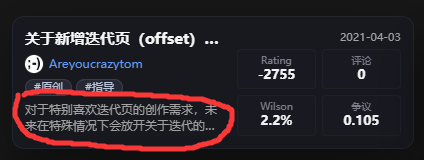
如果您希望为文章添加可供SCPPER爬取的一句话简介,可以使用以下参数:
[[include component:scpper-tracking-module]]
简介可以包含空格、换行、特殊符号(会干扰include块的“|”、“]]”除外),但不要包含Wikidot和HTML语法,因为它们不会被解析。过长的简介内容会被省略。请不要在简介中添加不适宜展出的内容,被发现可能会导致此页面被从SCPPER-CN中移除。这句简介会被显示在SCPPER对应页面的预览中。简介的更新频率随CROM更新页面更新,对于发布时间较早的页面,更新延迟可能较高。这句简介不会被显示在Wikidot的原页面中。
[[include component:scpper-tracking-module|scpper-preview=这是一句简介,SCPPER-CN通过解析这个include格式获取一句话简介。这个字段并不会被传入component。]]
[[iftags [[#ifexpr {$darkmode} == (true) | - ]]]]
[[/iftags]]
[[iftags [[#ifexpr {$monochrome} == (true) | - ]]]]
[[/iftags]]
[[iftags [[#ifexpr {$fullscreen-header} == (true) | - ]]]]
[[/iftags]]
[[iftags [[#ifexpr {$customized-title} == (true) | - ]]]]
[[/iftags]]
1. 不过好像并没有什么卵用😡。2. 当版头还没有被划出页面时,顶栏可能在划动页面时出现延迟,刷新页面可以解决(而且应该没多少人会注意到这个吧😓)。3. iOS17.3及以下系统的浏览器可能出现顶栏出现在版头上方的情况(都2026年了应该没有人会用这么老的手机了吧😱)。4. 一些系统自带的浏览器也会出现顶栏出现在版头上方的情况(什么人会用系统自带的浏览器看这个😨)。5. 这简直酷炸了🤤。6. 这是一个脚注。