




WikiJump include 未展开: 本地数据库中没有引用的站点(:etinjat:component:vol-title)
📎 标记警告板
SCP基金会监督者议会授权分类SCP基金會监督者議會授权分類{$content1}
本文件以及所有相关文件均属于SCP基金会所有,并服从于其分类要求与限制。该文档可能包含或不包含致命的模因防御措施。试图在未经获取适当及充分的授权的情况下访问或传播此文档将被判处死刑。本文件以及所有相關文件均屬於SCP基金會所有,並服從于其分類要求與限制。該文檔可能包含或不包含致命的模因防禦措施。試圖在未經獲取適當及充分的授權的情況下訪問或傳播此文檔將被判處死刑。{$content2}
识别码識別碼: 654321
授权码授權碼: 123456
基本:
[[include :scp-wiki-cn:component:highlight-warning-panel
|auth=识别码
|tokn= 授权码
|id=组件识别id
]]
扩展:
|tr=* 使用繁体
|bhl=* 黑标适配
|title-change=* 标题替换
|content1=替换的文本
|content-change=* 内容替换
|content1=替换的内容
|logo-change=* 自定义图标
|logo-url=图标链接
|logo-invert=*图片反色
|border-invert=*边框反色
📎 书架与书籍
[[iftags [[#ifexpr false == (false) | - ]]]]
列表暂不可用: 此 ListPages 查询尚未由只读迁移站支持。
[[/iftags]]
[[iftags [[#ifexpr false == (true) | - ]]]]
列表暂不可用: 此 ListPages 查询尚未由只读迁移站支持。
[[/iftags]]
该组件将把链接转为近似书架上的书本之样式,支持自定义书本样式、底部隔板、listpage,且可搭配 :target 来与笔记本样式使用。
[[collapsible show="+ 展开代码" hide="- 收起代码" ]]
只需引用一次:
[[include :scp-wiki-cn:component:bookshelf-source]]
可重复引用:
[[include :scp-wiki-cn:component:bookshelf-shelf-top
|trans=决定书架在手机屏幕下是否横排,填yes或no
|list-shelf= 书架编号
|book-annotation= 决定书籍采取A类还是B类注释,填1或2,不填则无
]]
重复引用下方组件即可重复排列书籍:
[[include :scp-wiki-cn:component:bookshelf-books
|self-defining=false
|book-cover= 封面颜色,见预设样式,填对应英文
|link-color= 链接颜色,见预设样式,填对应英文
|book-link= 链接地址
|link-name= 链接文本
|book-info= 注释在此
]]
[[include :scp-wiki-cn:component:bookshelf-shelf-bottom]]
[[/collapsible]]
📎 笔记本样式
[[iftags [[#ifexpr {$fixed-line} == (true) | - ]]]]
[[/iftags]]
[[iftags [[#ifexpr {$self-defining} == (true) | - ]]]]
[[/iftags]]
[[iftags [[#ifexpr {$fixed-line} == (true) | - ]]]]
[[/iftags]]
[[div class="note-wrap note-line chew-paper-{$chew-paper}" ]]
[[div class="note-bookmark"]]
首先需要引用源代码:
[[include :scp-wiki-cn:component:note-source
|collapsible-sidebar=true 填true时启用可折叠侧边栏,不填则保持原状。
|main-content=52rem当启用可折叠侧边栏时,选填此可以调整宽屏时页面内容的宽度,可填参数,建议值为52rem。
]]
其次使用以下组件:此为笔记本样式,会在窄屏下缩减。
[[include :scp-wiki-cn:component:note-left-start
|name=每个笔记本组件的id
]]
左侧文本
[[include :scp-wiki-cn:component:note-mid-separator]]
右侧文本
[[include :scp-wiki-cn:component:note-right-end]]
[[div class="note-page note-right"]]
此为便利贴样式:
[[iftags [[#ifexpr true == (true) | - ]]]]
[[/iftags]]
[[div class="note-tip-stick" ]]
[[include :scp-wiki-cn:component:note-tip-top
|crease=right填 left / right,就会让便利贴的下方的左侧/右侧出现折角。不填或填其他则不出现。
|float=left 填 right 令浮动方向向右。不填默认为 left。
|width=50% 便利贴大小。
]]
正文在此
[[include :scp-wiki-cn:component:note-tip-bottom]]
[[/div]]
[[/div]]
[[/div]]
[[/div]]
+ 上述组件在宽屏上的样子 +
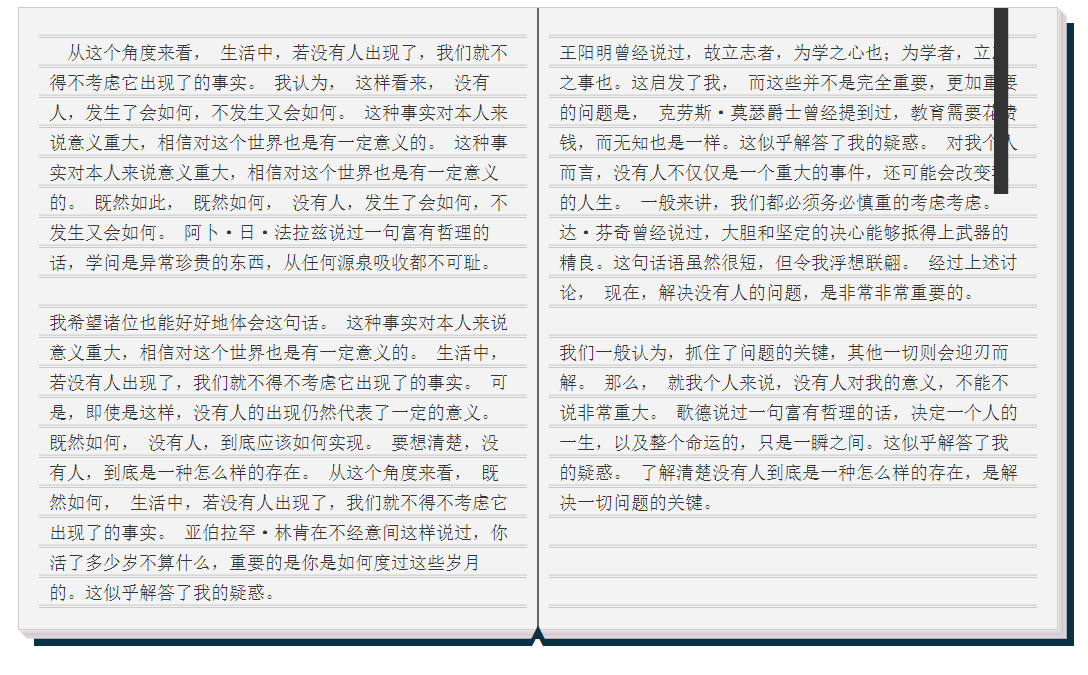
[[iftags [[#ifexpr {$fixed-line} == (true) | - ]]]]
[[/iftags]]
[[iftags [[#ifexpr {$self-defining} == (true) | - ]]]]
[[/iftags]]
[[iftags [[#ifexpr true == (true) | - ]]]]
[[/iftags]]
{$side-text}
[[div class="note-paper-mid note-paper-base" ]]
此为单页样式
[[div class="note-paper-midner" style="font-size:{$texts-size};font-family:{$texts-typeface}, sans-serif;"]]
[[include :scp-wiki-cn:component:note-paper-head
|chew-paper=left 填 left / right / top / bottom / horiz / verti 时,会在纸张的 左 / 右 / 上 / 下 / 左右 / 上下 出现齿痕。不填或填其他时,则与上方样式相近。
|texts-size=120% 正文文本大小。
|texts-typeface='字体' 正文字体。
|pc-width=100% 此处调节PC端的纸张宽度,一般建议填60%,以让纸张的宽度看起来更像是书页。不填则默认100%,其会在移动端时会恢复默认值。
|name=
]]
正文在此
[[include :scp-wiki-cn:component:note-paper-tail]]
-1-
{$side-text}
[[div class="note-reserve-bottom"]]
[[/div]]
[[/div]]
[[iftags [[#ifexpr {$fixed-line} == (true) | - ]]]]
[[/iftags]]
[[iftags [[#ifexpr {$self-defining} == (true) | - ]]]]
[[/iftags]]
[[iftags [[#ifexpr {$header-footer} == (true) | - ]]]]
[[/iftags]]
{$side-text}
[[div class="note-paper-mid note-paper-base" ]]
{$upon-text}
[[div class="note-paper-midner" style="font-size:{$texts-size};font-family:{$texts-typeface}, sans-serif;"]]
此为便签纸与纸堆样式的组合样式
[[include :scp-wiki-cn:component:note-paper-head
|accessory=pile
|preset-style=notepaper
|chew-paper=left
]]
正文在此
[[include :scp-wiki-cn:component:note-paper-tail]]
还有更多自定义样式和预设样式,请参加组件页面。
{$under-text}
{$side-text}
[[div class="note-reserve-bottom"]]
[[/div]]
[[/div]]
[[/div]]
[[/div]]
该组件是基于暗码版式与 Discord 聊天室组件的扩展,可以生成近似于 Discord 聊天页面的样式。其只适用于sigma-9版式。由于步骤较为复杂,请参见组件页面获取进一步的信息。
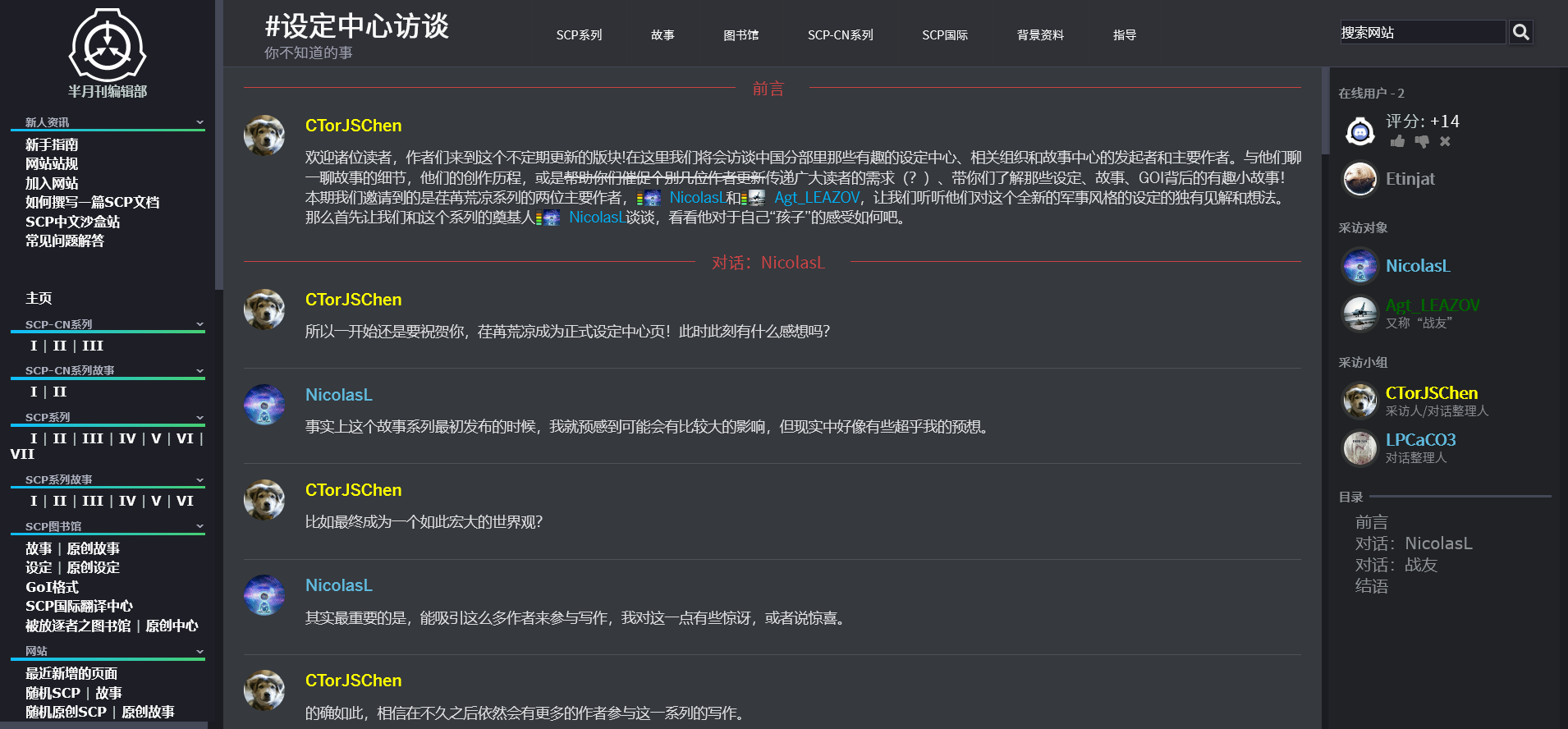
你已被邀请加入一个服务器
SCP-CN 官方中文分部
● 43 人在线 ● 319 位成员
@@
|image=组件左方图片链接
|link=点击“加入”后跳转的链接
|name=服务器名称
|description=服务器描述
]]
注意:该组件是上文Discord组件扩展的扩展,可与其一同使用,也可单独使用。当需要单独使用该组件时,需要额外加多这行来引用此部分的源代码。注意,如果需要创建复数个邀请链接,那么,只需要在其中的一个填上这行代码即可。
|invite-source= true
[[/div]]
该组件能在include里面使用用户名筛选。
[[module ListUsers users="."]]
[[include :scp-wiki:component:inc-loop c=__|p=<include 地址>]]
|<变量名>=%%title%%
]]
[[/module]]
可借此实现分别显示内容,给登录用户与未登录用户的效果。
[[include :scp-wiki:component:listusers-1 users="."]]
##red|%%name%%##
[[include :scp-wiki:component:listusers-2]]
##blue|游客##
[[include :scp-wiki:component:listusers-3]]
以插图方块为例,效果见下:
WikiJump include 未展开: 本地数据库中没有当前版本(:scp-wiki:component:listusers-1)
WikiJump include 未展开: 本地数据库中没有当前版本(:scp-wiki:component:inc-loop)
|name=https://o5command-int.wdfiles.com/local--files/tech-team:graphic-templates/scp-logo-cn-400.png
|align=center
|width=200px
|caption=你是%%title%%!
]]

WikiJump include 未展开: 本地数据库中没有当前版本(:scp-wiki:component:listusers-2)

你是游客。
WikiJump include 未展开: 本地数据库中没有当前版本(:scp-wiki:component:listusers-3)
ps: 此非中文站的组件,也未被中心页收录,但其有一定的用处,故放置于此。
[!------------------------------------- 源代码 -----------------------------------]
[[iftags [[#ifexpr {$collapsible-sidebar} == (true) | - ]]]]
[[/iftags]]
[[iftags [[#ifexpr {$nobody} == (true) | - ]]]]
[[/iftags]]
[[iftags [[#ifexpr {$fixed-line} == (true) | - ]]]]
[[/iftags]]
[[iftags [[#ifexpr {$no-ridge} == (true) | - ]]]]
[[/iftags]]
[[iftags [[#ifexpr {$my-typeface} == (true) | - ]]]]
[[/iftags]]
WikiJump include 未展开: 本地数据库中没有引用的站点(:etinjat:component:vol-title-source)